

Coding agents (could, and therefore will ) waste money. A session learns how to run tests in a repo, exits, and the next session starts completely blind. The agent spends its first five minutes rediscovering the test suite, stumbling into the same edit-retry loops, and running up your API bill. Even with prompt caching, that redundancy adds up.
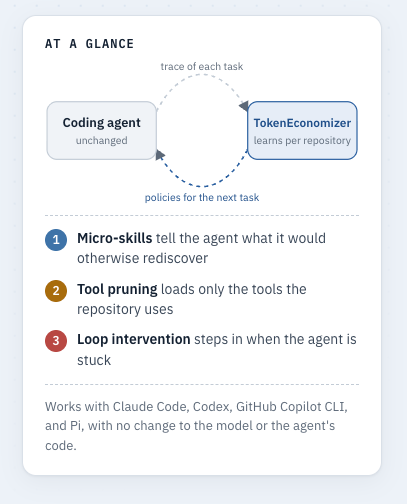
Microsoft’s and UC Berkeley’s TokenEconomizer aims to fix that. Instead of tweaking the model itself, it caches insights across sessions so later runs skip the preamble. The initial paper claims roughly 18% to 31% lower costs on SWE-Bench.
I wanted to see if that holds up outside a lab environment, so I ran the experimental controller through GitHub Copilot CLI and Claude Sonnet 5, routing traffic through Talon to keep the API budget from spiraling out of control.
Where to use it
The plugin doesn’t magically fix a messy codebase. It shines in active repositories where the same team repeatedly fixes bugs or refactors code over weeks and months. That’s where persistent micro-skills, like remembering a weird test command or a failing path actually save tokens.
If you’re spinning up disposable repos, running one-off questions, or dealing with a project that changes completely every week, skip it. There’s no historical context worth saving.
Also, check your prompt hygiene first. If your team is dumping hundreds of irrelevant tool schemas or unbounded test outputs into the context window, fix that manually before trying to optimize with a plugin. Otherwise, you’re just attributing basic housekeeping to the optimizer.
How it changes the agent under the hood
The plugin relies on three main ideas:
Micro-skills: Small snippets of learned context injected at session start so the agent doesn’t have to rediscover environment quirks.
Tool pruning: Removing unused tool definitions from the prompt. Be careful here—how this works depends heavily on your agent. Claude Code lets you prune individual tools, but Copilot CLI usually disables an entire MCP server at once. If your MCP server has twenty tools and you only use one, you’ll break things fast.
Failure-loop guards: It watches for repetitive, failing edit loops and tries to nudge the agent out of them. Note that in the installable plugin, this just warns the user; it won’t hard-kill an unattended run unless you configure external safeguards.
Running a safe pilot
If you want to test it without letting an automated script loose on your production tools, don’t jump straight into auto-pruning. Start in shadow mode so you can see what the plugin would do without letting it touch your prompts:
~/.tokeneconomizer/bin/te --host claude config set \
  paid=false shadow=true toolprune=propose
Let it run for a few ordinary sessions. Look at what micro-skills it generated and which tools it flagged. Once you trust its output, you can allow manual application (toolprune apply), and only move to fully automated pruning once you’re confident it won’t strip out something vital.
One setting worth leaving alone is the idle timeout default toolprune_quiet_minutes=60. TokenEconomizer waits for the repo to sit idle before rewriting tool schemas because changing tools mid-cache invalidates your prompt prefix, forcing the model to rewrite context and potentially spiking your bill instead of lowering it.
The reality check
I tested the setup using the 20-task sequence from ByteDance Web-Bench, using Claude Sonnet 5 at high effort.
The run didn’t finish cleanly for either side during multiple tries, unfortunately. The baseline arm completed 15 out of 20 tasks; the experimental controller reached 10. Early on, a naive metrics made the controller look like a massive win, saving over 50% in effective tokens. But then I understood, that was a mirage caused by unfinished tasks counting as zero-cost rows.
When I stripped out the noise and compared only the nine tasks that both arms successfully completed and passed, the numbers looked like this:
Baseline: 857,556 cache-aware effective tokens.
Controller: 712,093 effective tokens (including optimizer overhead).
That’s a 17% reduction on a matched, successful prefix. But it wasn’t a clean sweep—the optimizer was only cheaper on five of those nine tasks. And on some of the tasks, the experimental agent simply stalled out, submitting zero file changes across multiple attempts before throwing session errors.
Deep dive on costs
Because I routed traffic through Talon as an independent gateway (both to prevent unexpected spend and collect more information), I was able to track actual spend without trusting the benchmark harness alone.
For example, in one of the tests - the baseline ran up $4.99 across 265 admitted calls before hitting budget limits; the experimental controller hit $2.28 across 139 calls. But since the experimental arm stopped early, you can’t simply subtract those numbers and call the difference pure savings.
The more interesting takeaway was how the token economics broke down:
Nearly 95% of the baseline’s prompt tokens were cache reads, but those reads accounted for only 38% of the actual model cost.
Cache writes ate up roughly 27%, and output tokens took 34%.
If an optimization changes your prompt prefix layout, the cache-write overhead can easily wipe out whatever savings you expected from reading cheaper input tokens. Metered AI isn’t just about raw token counts; it’s about what kind of tokens you’re spending.
Summa summarum
If your team is paying heavy API bills on repetitive, long-running coding agent tasks in stable repositories, TokenEconomizer is worth a pilot. But don’t expect plug-and-play miracles. Track actual successful tasks completed, look at your cache-write overhead, and make sure you have an external spending guard in place before you hand an autonomous agent the keys to your API account.